One of the main tasks of the owner of any online business is attracting new customers. The specially designed marketing tools can effectively cope with the similar goals. It will allow you to capture the attention of the resource visitors and motivate them to take the necessary actions.
The level of site conversion is affected by the large number of factors. They are: the ease of use, design, information content, the semantic core and much more. However, there are some tricks that allow the web resource owner to get the desired lead.
1. Create the tempting offer and limit its validity
The unique WordPress plugin Wow Countdowns Pro will become the reliable tool for achieving the success of various kinds of projects. Its functional features allow you to create urgency and scarcity effects on the site. Limiting the time of profitable offers action is one of the most effective ways to motivate the user. With its help the offered product becomes more valuable for customers.
For parsing the detailed example, let’s take as the basis the activity of the online store selling various sets for needlework. Create in one of its posts the limited offer with the discount and free shipping as the gift for the period of 24 hours.
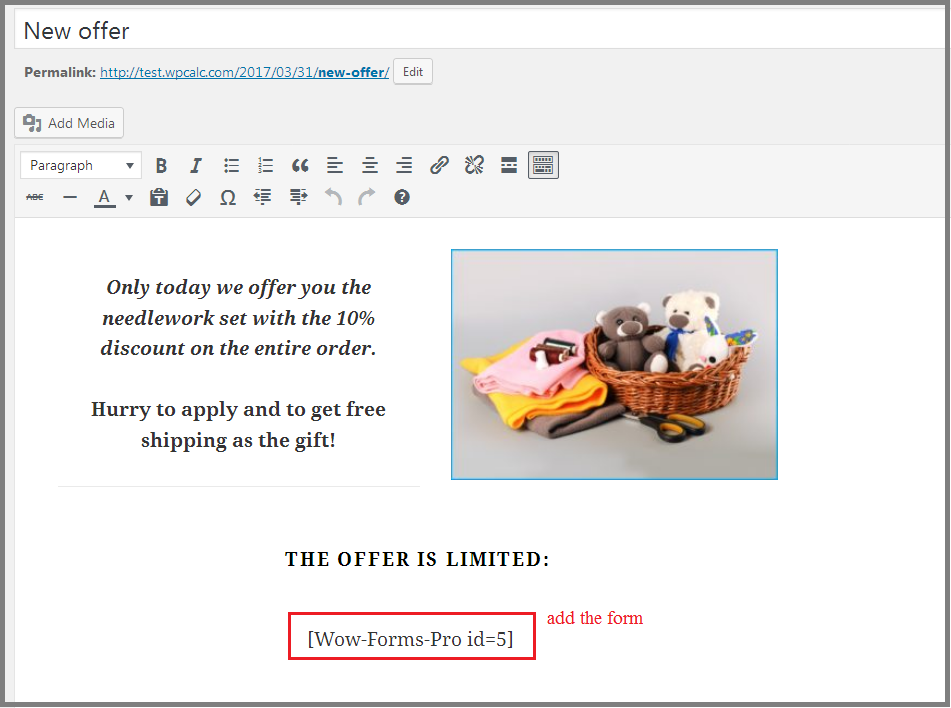
Fig. 1 Create the post about the profitable offer on the site
Specially caused shortage of goods provokes users to spontaneous purchases. Seeing as the time of the desired offers is coming to an end, they decide to order. Add the form for the customer convenience. It can be easily created using the Wow Forms Pro functional expansion.
Use the Wow Countdowns Pro plugin to create the timer with the countdown action. To do this, use the basic settings:
- select the action type “Time with cookies”. The use of the browser cookie allows you to manage flexibly the duration of the action for each individual user;
- set reset data every 15 days. The proposal will be active 2 times a month;
- indicate the validity in the appropriate box – 24 hours;
- leave all the titles hidden by default.
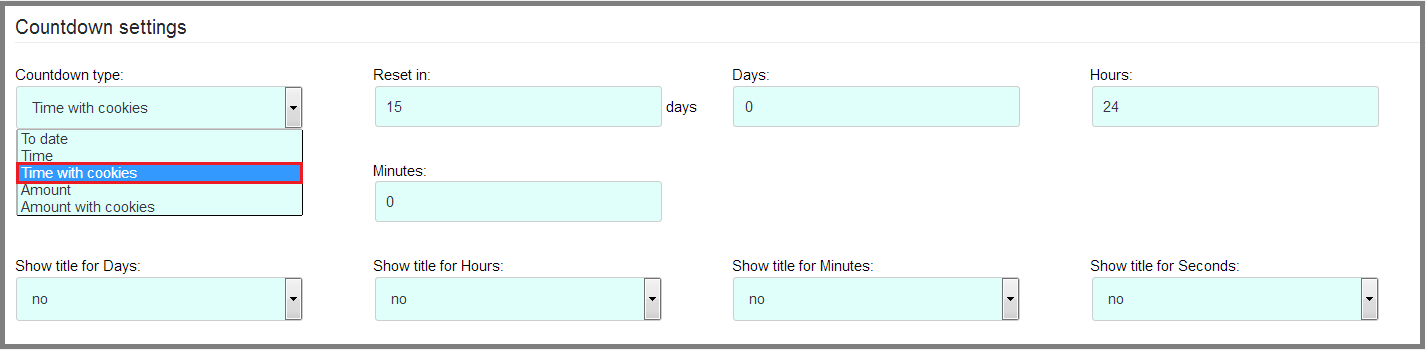
Fig. 2 General settings for the countdown timer
The special menu for adding triggers will allow you to set the behavior of the counter after the countdown is complete. Run two options for the development at once:
- Display the line with the inscription about the completion of the offer action. Use the “Show content” and the text editor.
- Hide the order form because of its irrelevance. Select the “Hide block” in the list, specify the selector type as Id and enter its corresponding number – “wow-form-id-5”.
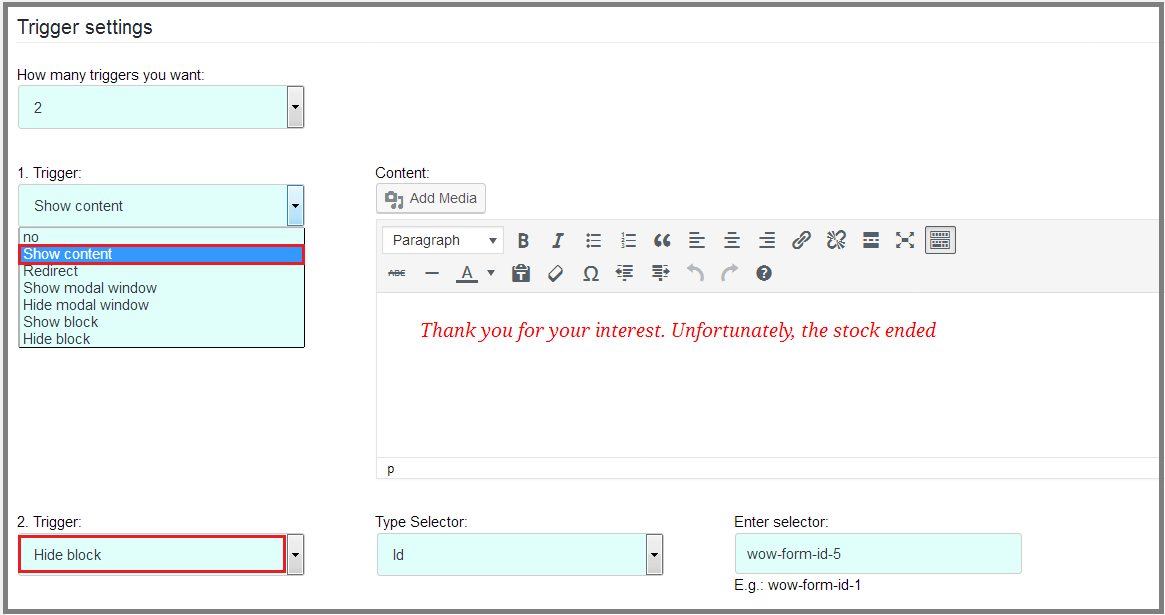
Fig. 3 Options to add triggers
Let’s change the appearance of the counter for its harmonious display on the site. Use the parameters in the section “Style settings”:
- hide the display of days in the time count;
- set the total width – 50%;
- indicate the padding on all sides – 10 px;
- set the border width to 2 px and the degree of its rounding for an additional decorative effect – 15 px;
- change the font size – 30 px;
- select the color gamma for the background, the border and the displayed time of the timer.
The other settings leave by default.
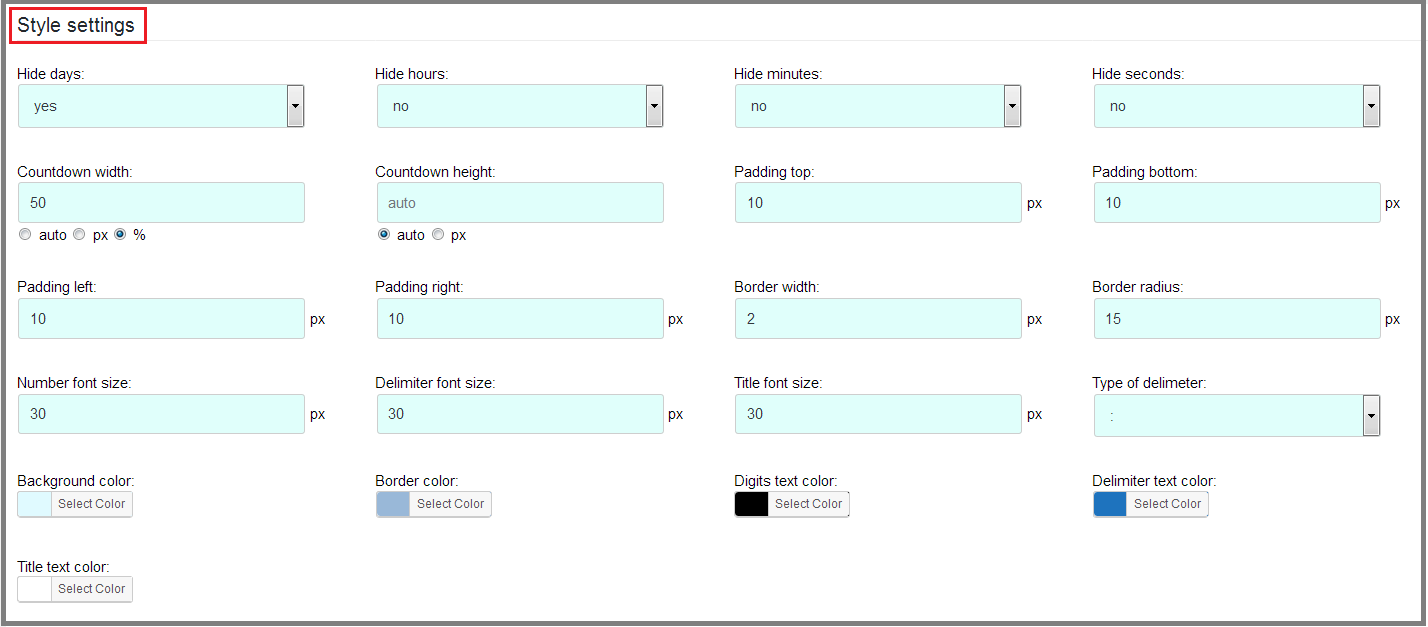
Fig. 4 The settings for the counter style
Ready-to-use countdown timer add to the post with the promotion offer. Paste its shortcode [Wow-Countdowns-Pro id=2] before the order form on the page.
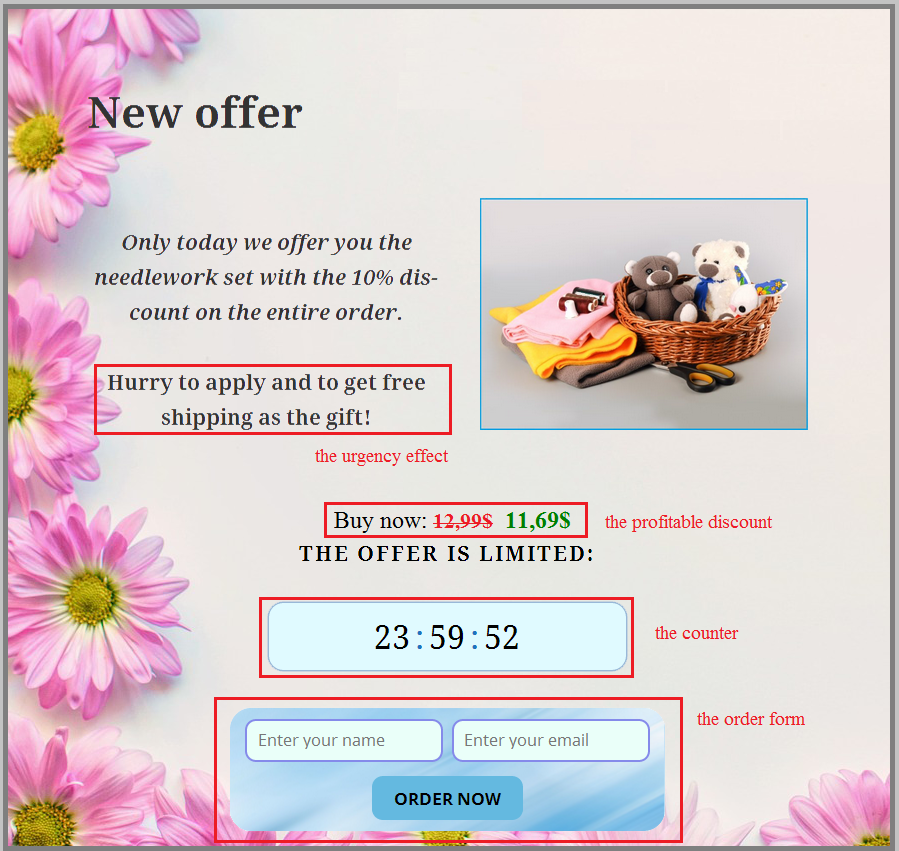
Fig. 5 Display the offer with the counter on the site
2. Demonstrate the user activity
The placement of scarce promotional products on the site and the using of the “herd effect” demonstrate the colossal result. Going to the web resource, the user sees the favorable offer at the discount, but does not dare to buy it. Adding the countdown timer can motivate the visitor to make the purchase. The pop-up message about the activity of other visitors on the site will enhance the effect.
To create it, use the Wow Herd Effects Pro plugin. In the display settings, show the notification on all pages of the site. The message to be displayed to all users, select the option “All users” in the suggested list of options. Select the option “All users” in the suggested list of options in order to display the message to all users.
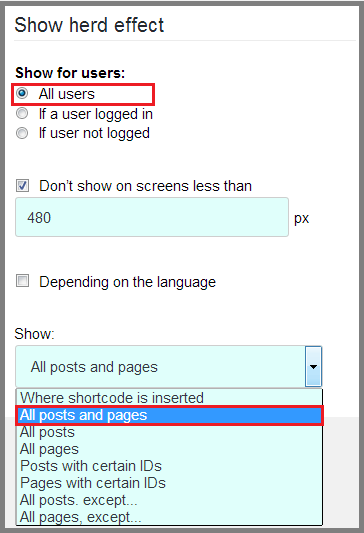
Fig. 6 Set the parameters of the “herd effect” display
In the “Content” menu, set the title of the pop-up notification (New Order), the text with the variables and the icon to attract attention. As variable data, use the name [varible1] and the city where the users live [varible2].
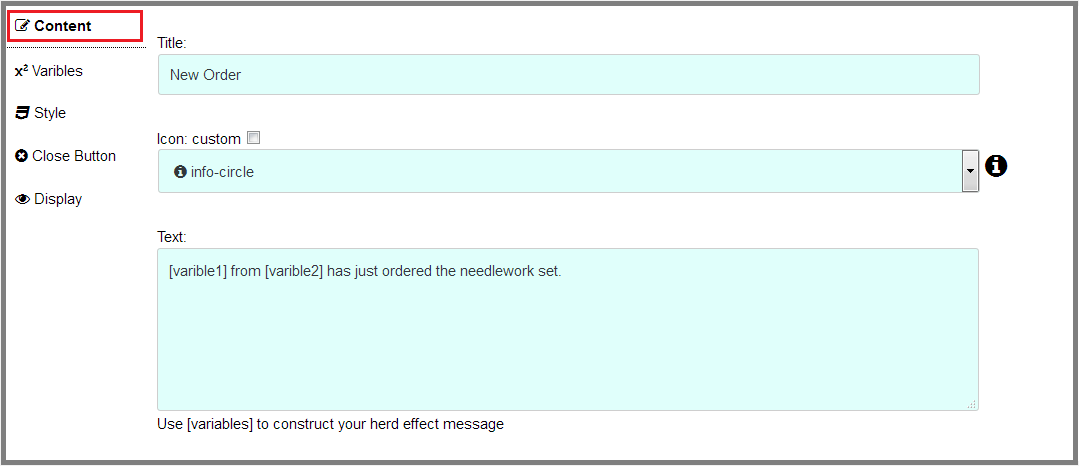
Fig. 7 The «Content» menu options
Variable values are specified in the «x2 Varibles» section. Enter the information about users in the appropriate data fields using commas. For example, 20 variants are indicated.

Fig. 8 Write variants of values for the two variables
Use the “Style” menu to edit the external appearance of the pop-up message. Let’s change the parameters:
- add the border in 1 px with the decorative rounding of corners at 10 px;
- set the appearance position to 10% of the top and 20% of the right edge of the window. The notification position in the left and the bottom borders of the page leave inactive;
- change the color scheme for the background, the border, the text and the icon.
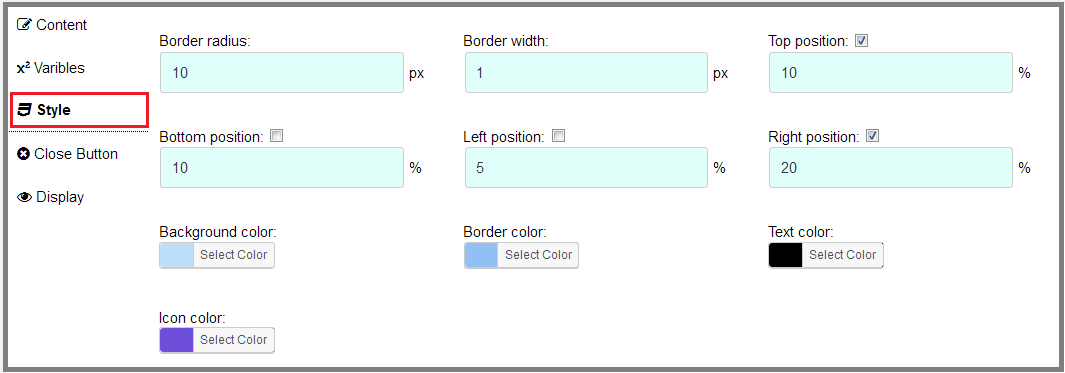
Fig. 9 The menu to set the external appearance of the “herd effect” message
The display of the closing button is not changed. All parameters in this menu are left as default.
Via the “Display” options:
- set the random display. It will add more realism and will increase the effect on the user;
- specify the minimum and maximum time period for displaying the message to the user – from 5 to 10 sec;
- select animation effects when the notification appears and disappears. Set its duration to 400 ms.
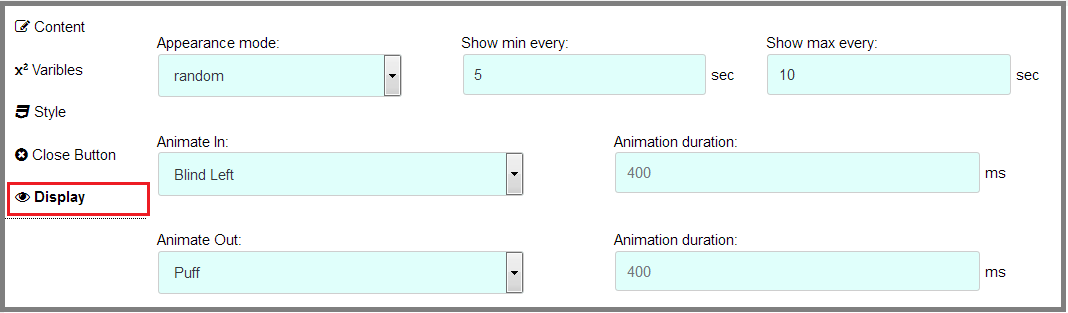
Fig. 10 Set the behavior of the pop-up message
After saving all the settings for the “herd effect” notification we can observe its appearance on the site at the specified periodicity.

Fig. 11 Output of the “herd effect” message on the site
Such marketing tools are successfully used to raise the conversion of the web resource. They are able to establish the stable flow of leads and ensure the development of your online business.